


“You have one hour to sell me on AI”, I heard from a >$10M CEO last Friday morning.
What would you do?
..
..
..
I decided to go all in on Claude Cowork. Context is everything (he’s an ex-McKinsey consultant).
We spent:
10 minutes signing up to Claude and installing the app,
20 more minutes waiting for the Claude Cowork workspace to initialise,
and then 20 minutes with Opus 4.6 on just two demos (I’ll tell you later what they were).
We blew through the Pro plan weekly quota almost immediately but what happened next likely changed the course of his company.
Or did it?
”Invest in AI!” proclaim the consultants, authors and influencers. Yet it’s not been obvious how.
Most advice boils down to “just use the tools” but there’s a difference between people who are bottlenecked by their token budget vs. your average Gen Z Tik Tok consumer that relies on ChatGPT for relationship advice.
It may work on a personal level but it’s even more confusing on an a company level.
What do you build?
What do you share?
How do you work around security risks?
What infrastructure do you depend on?
The smart money knows the answer boils down to “CLIs and skills”. CLIs allow you to leverage the immense power of coding agents to create repeated deterministic tools that are better than MCTs. We already explained that one.
And skills represent real institutional knowledge, intelligent special purpose agents you can wake up to do your bidding.
SKILLS
Skills are pre-packaged prompts used primarily by long-running agents like Claude Code and Codex. You can create them by putting a prompt in a folder with a SKILLS.md file or using a dedicated skill.
Skills can range from simple prompts that explain how to use a particular tool (e.g., a skill for creating PowerPoint presentations with the Claude pptx-tool) to playbooks to enlist Charlie Munger as your CFO:
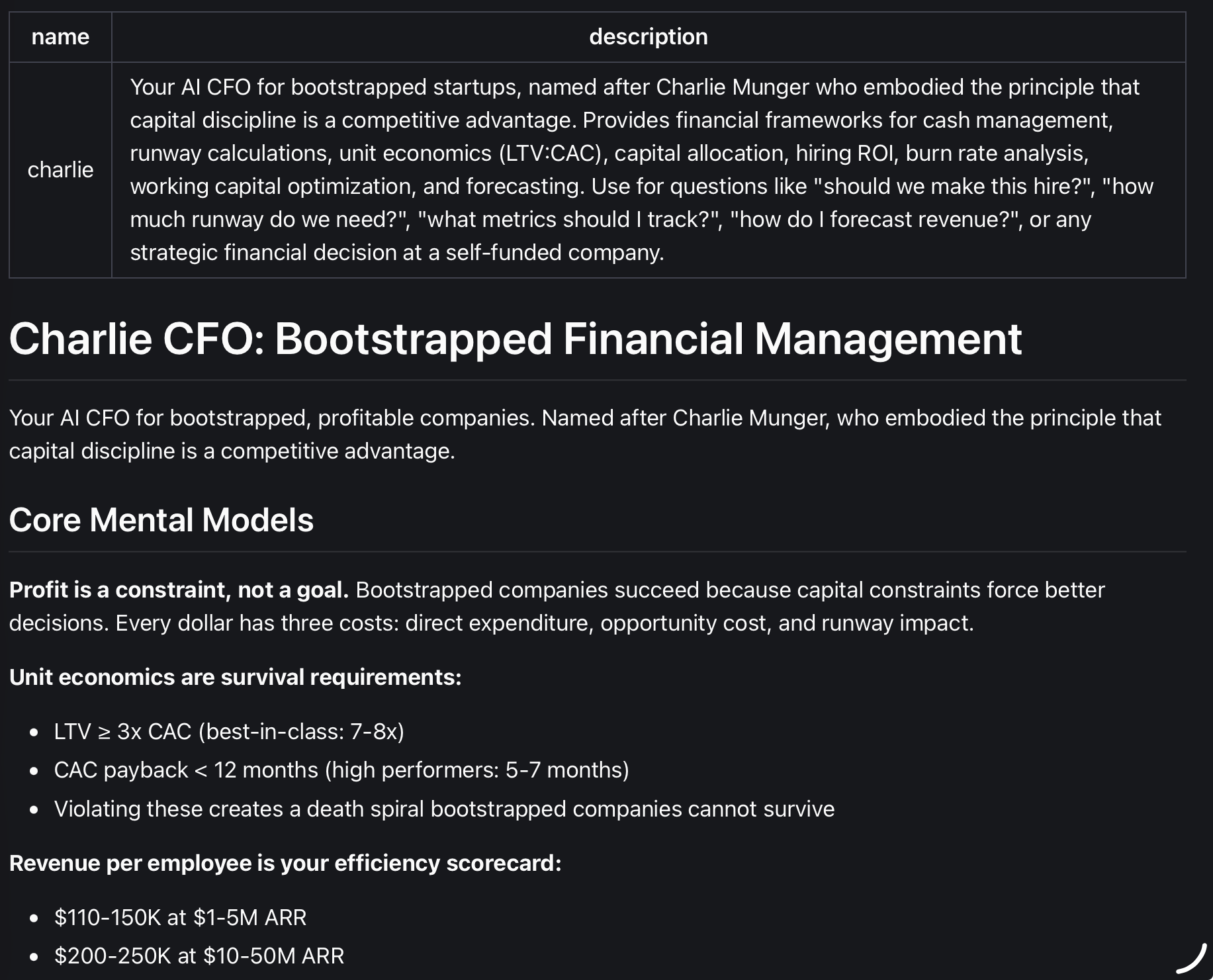
Reusing prompts is the simplest use case for skills at a personal level.
Integrating tools is another. If you built a CLI (remember CLIs+skills?), a good way to integrate it in your workflow is to write a quick explainer for when and how to use the CLI.
Building playbooks and custom workflows is another. Everything from an editorial grammar check to a full smart contract auditing playbook can be expressed since skills plug into agents with planning and execution capabilities.
Skills REPLACE Custom Agents
The most powerful ways to think about skills is that they replace the need for custom agents in many cases (especially internally). I’ve built a number of custom agents directly and were bogged down by things like planning, having to be too prescriptive about workflow, providing access to basic tools (like providing Google Search API keys) and even chunking more complex tasks.
Ultimately, building custom agents directly isn’t worth it anymore unless you want to bundle them as part of an externally-facing product.
Skills, however, are the perfect way to create custom agents:
You benefit immediately from all the system prompts, planning, context management, memory management, UI, access, tool and other capabilities of these remarkable general purpose agents (Code & Codex). Nothing needs to be rebuilt.
Skills compose and can be used with one another in previously unanticipated use cases.
Skills are readable by everyone in your organization (just like a playbook) whereas custom agents could have their prompt instructions hidden in Python/JavaScript files. Equally, they can be created by everyone in your organization as well.
But while skills can help accrue and share institutional AI knowledge, you also have to use them right.
It’s a SKILL ISSUE
Here are some conventions we are starting to apply to skills use at Auditless. Would love to hear if you see them differently.
Avoid sharing skills before you use them.
Skills are not a replacement for playbooks, standards and quality controls. You should have those in place already. Skills are a tool that helps you implement the standards. Skills can refer to these standards, however, so you may use them as a convenient place to align on issues but humans are responsible that the standards met, not agents.
It can also be tempting to write skills for everything that you may ever need to prompt for. But sharing a skill should represent some amount of iteration and confidence that the skill is effective at achieving a certain outcome. That can only come for repeated prompting and tuning.
Don’t rely on AI to generate your most important skills in their entirety.
There’s a temptation to let AI generate prompts and this is often applied to skills. Just remember that the AI-generated version of a skill is v0. The more you will use a skill, you’ll want to make sure that it represents the best possible playbook for implementing a certain task. It’s OK to jump in and edit a skill or even to do an eval from time to time in the same way you would do it for custom agents.
Use skills instead of AGENTS.md where possible.
Don’t put too much knowledge or procedural knowledge in your AGENTS.md (context) files. One of the primary benefits of skills is progressive disclosure and more efficient context utilisation.
Don’t build a skill for what could be a tool.
If you are doing something deterministic (file formatting, pulling a date, etc.), it is more efficient to use the right tool for it. If in doubt, ask your agent whether something could be built and if you’re non-technical, learn how to vibe code to build these tools. You’ll get increasingly comfortable doing so.
I mentioned two demos at the beginning. One was a research task on the CEO’s industry which pulled their top 20 clients and a summary of information that could only be extracted by carefully analyzing all their public statements and announcements. It was assembled in a neat Excel document. The latter was a 10-page presentation on the last 3 days of Australian politics.
Claude nailed both.